/bemaru/dev/log

    diskcleanup 1

    [Windows] 윈도우 디스크 여유 공간 확보하기

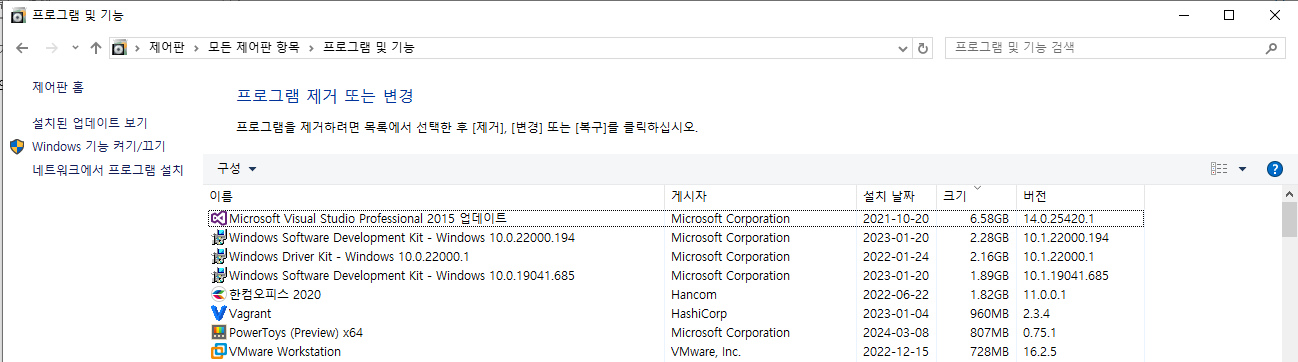
    1. [프로그램 및 기능] 에서 설치 프로그램 제거하기[시작] > [제어판] > [프로그램 및 기능] 경우에 따라 [제거] 메뉴가 없을 수 있습니다. 이 경우 [변경]을 눌러 삭제 가능한지 확인해보세요. 2. [앱 및 기능] 에서 설치 프로그램 제거하기[시작] > [설정] > [앱 및 기능][앱 및 기능] 에서 크기순으로 정렬하고 불필요 프로그램 제거하기 3. Windows Update Clean Tool 4. Sapce Snifferhttp://www.uderzo.it/main_products/space_sniffer/index.html SpaceSniffer, find lost disk space the easy way.Brief product description Latest release i..
    미분류 2024.05.20
    이전
    1
    다음
    더보기
    프로필사진

    https://github.com/bemaru

    • 전체 글목록 (85)
      • AI (0)
      • DevOps (0)
      • Windows (1)
        • Windows 개발 환경 (0)
      • 프로그래밍 (0)
      • 커리어 (0)
      • 미분류 (84)

    Tag

    Directory, VMware, CPP, 프로그래머스, find file, 폴더, 알고리즘, aws #ec2 #ubuntu #gui #rdp #원격데스크톱 #port, diskcleanup, 해시, Visual Studio, cmd, Windows, 용량최적화, C, golang, 분할된 iso, C++, folder, 윈도우,

    최근글과 인기글

    • 최근글
    • 인기글

    최근댓글

    공지사항

    페이스북 트위터 플러그인

    • Facebook
    • Twitter

    Archives

    Calendar

    «   2026/02   »
    일 월 화 수 목 금 토
    1 2 3 4 5 6 7
    8 9 10 11 12 13 14
    15 16 17 18 19 20 21
    22 23 24 25 26 27 28

    방문자수Total

    • Today :
    • Yesterday :

    Copyright © Kakao Corp. All rights reserved.

    티스토리툴바